Stepping into AI & Oh My Llama!
I am being a little unfair to myself here — I’m not a total newbie to AI, having worked with computer vision Deep Neural Networks (DNNs) before and having GitHub Copilot write my unit tests for me pretty much daily. However, I never really felt I understood enough of what was happening in the black box, particularly when we start to talk about agentic AI.
To that end — and because I’m a bit of a skinflint — I thought I would take a look at whether you could run a model locally, interact with it, and see what was possible.
So, in this post, I’ll explain how I set up Ollama in Docker and ran the qwen3:8b model locally on my RTX 3080.
Ollama & OpenWebUI
Ollama can run loads of open models, and you can basically pick one that fits with your hardware. In my case, I lucked out pretty quickly — on the third model I tried — and I find qwen3 works for what I need right now. But we can change models at the drop of a hat, so it isn’t really an issue.
OpenWebUI gives us a nice web UI and loads of tools we can hook up. Again, it’s all open source and can run in Docker.
Because I am also a little lazy, I set up the following Docker Compose file, then ran:
docker compose up -d
After that, I could navigate to http://localhost:8282 and pull models directly from the web interface.
Make sure you replace %%REPLACE_WITH_YOUR_OLLAMA_DATA_FOLDER%% with a path to where you want your models saved. They can be big, so I stick mine on a separate drive.
services:
  ollama:
    image: ollama/ollama
    container_name: ollama
    ports:
      - "11434:11434"
    volumes:
      - "%%REPLACE_WITH_YOUR_OLLAMA_DATA_FOLDER%%:/root/.ollama"
    restart: unless-stopped
    deploy:
      resources:
        reservations:
          devices:
            - capabilities: ["gpu"]

  open-webui:
    image: ghcr.io/open-webui/open-webui:main
    container_name: open-webui
    ports:
      - "8282:8080"
    extra_hosts:
      - "host.docker.internal:host-gateway"
    volumes:
      - open-webui:/app/backend/data
    restart: unless-stopped

volumes:
  open-webui:
To pull a model, go to the dropdown in the top left and type in the name of the model. It will give you the option to pull it from Ollama.
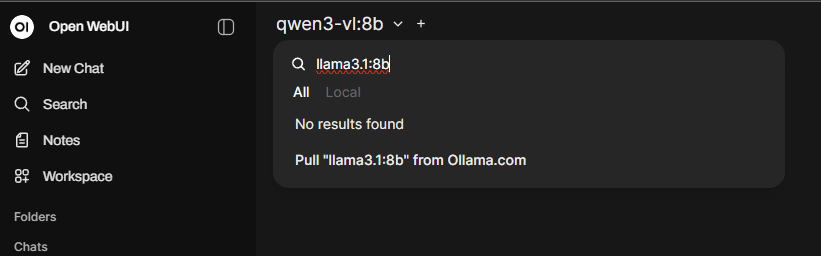
Agree, and it will start the download and give you a progress bar. Do something else for a little while and then once it’s finished, you can chat with your new model directly in the Open WebUI interface.
You can see all of the available models at https://ollama.com/library, but I used qwen3:8b, and it runs really smoothly on my RTX 3080.
If you open Task Manager, you’ll notice there is a bit of a pause in response time while the model loads into VRAM. But once it’s in there, the responses are fast enough for me.
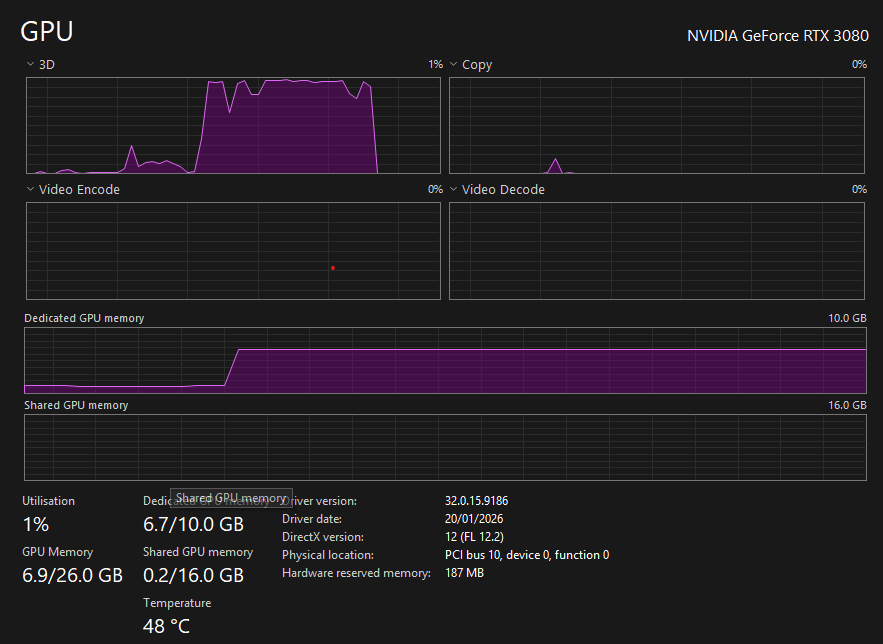
Notice the model loads into vram in its entirety first and the 3d compute spike while it processes the question and then drops again after its answered. Try it out if you have the hardware, it is suprisingly effective.
Of course, running a local model is pretty trivial. Getting it to reason across tools, maintain state, and act? That's where things get interesting — and that’s what we’ll explore next.